Most beginners who try AI art for the first time quickly hit the same wall:
They know what they want to create…
…but they don’t know how to write the prompt.
They picture a terrifying zombie face dripping with decay — but the AI produces a goofy cartoon.
They imagine a cinematic undead warrior — but the AI gives something soft, blurry, and nothing like their vision.
For many new users, prompt crafting feels intimidating.
Not because they’re not creative — but because they don’t yet understand the “language” of AI.
Now imagine an app that removes this pressure by showing you the exact prompts used to create zombie-themed AI images.
That’s what Zombie AI Art does.
This Android app doesn’t just display finished images — it reveals the real prompts that generated them. For beginners, this is like opening a treasure chest of knowledge, instantly showing how professional-looking AI zombie art is actually made.
This article explores how Zombie AI Art helps total beginners understand prompt structure, learn the logic behind AI image generation, and ultimately create their own horrifying, cinematic zombie artworks with confidence.
Why Prompt Crafting Matters in AI Art (Especially for Beginners)
Every AI art generator — from Stable Diffusion to Midjourney — follows the same rule:
Better prompts = better images.
You can have the best AI model in the world, but if the prompt is unclear or incomplete, the results will always disappoint.
Beginners Often Struggle With:
-
Not knowing which descriptors improve realism
-
Missing critical elements like lighting, textures, and atmosphere
-
Using short prompts that produce vague images
-
Not understanding style modifiers
-
Not knowing what words create the “intensity” of zombie art
For example:
“zombie face”
→ basic, blurry, flat output
But:
“hyper-realistic zombie face, rotting skin texture, glowing dead eyes, cracked skull, cinematic lighting, highly detailed, 4K horror aesthetic”
→ suddenly looks like a Hollywood poster.
The difference?
Prompt power.
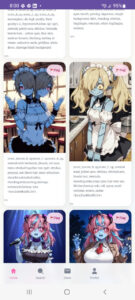
Zombie AI Art helps beginners see this difference immediately — because the app pairs every zombie image with the exact prompt behind it.
It becomes a visual dictionary for learning how AI “understands” instructions.
What Makes Zombie AI Art Different From Other AI Image Apps?
There are hundreds of AI art apps on Google Play, but almost none of them show the actual prompts used to generate images.
Most apps:
-
hide prompts
-
only show final results
-
offer generic preset styles
-
don’t explain how the image was made
Zombie AI Art does the opposite.
Shows the real prompts
Every image in the app is directly paired with the input that generated it.
Helps beginners understand prompt-building
Simply reading the prompts teaches more than any tutorial.
Focuses on a single niche: zombie + horror
This specialization makes learning easier because beginners see patterns and structures tailored to one style.
Perfect for Android users who want inspiration
No complicated UI, no confusing controls — just examples and prompts.
Great for teens, beginners, and AI art hobbyists
Even if the user knows nothing about AI art, they can learn by observation.
Zombie AI Art functions not just as a gallery — but as a learning tool.
How Zombie AI Art Teaches Beginners Through Real Prompts
When beginners see a zombie image paired with its prompt, something clicks instantly:
“Oh… that’s the phrase that created the creepy eye glow.”
“So that’s how they added the decayed skin texture.”
“This is why the lighting looks cinematic.”
“I should add style modifiers!”
The app transforms prompt learning from abstract theory into concrete examples.
Here’s how beginners learn naturally:
1. They observe the structure of effective prompts
Beginners start to notice consistent elements:
-
subject
-
descriptors
-
style modifiers
-
lighting
-
emotions
-
detail levels
-
rendering quality
2. They see how small changes create big visual differences
Example:
“zombie portrait, glowing red eyes”
vs
“ultra-detailed zombie portrait, glowing red eyes, cracked jaw, dried blood, cinematic rim lighting, 4K horror realism”
The app doesn’t just teach — it shows.
3. They learn vocabulary they would never think of
Words like:
-
decayed
-
undead
-
decomposed
-
necrotic
-
tattered flesh
-
gritty atmosphere
-
eerie fog
Some beginners don’t even know these English terms until they see them in prompts.
4. They pick up cinematic techniques
Many prompts contain:
-
volumetric lighting
-
dramatic shadows
-
35mm lens
-
ultra-realistic textures
-
HDR
-
film grain
This exposes beginners to professional visual terminology.
A Breakdown of Common Zombie AI Prompts (With Real-World Examples)
Zombie AI Art includes many types of zombie prompts, and each category teaches different artistic techniques.
Below are examples inspired by the types of prompts commonly found in the app — broken down for beginners.
Example Prompt 1 — “Realistic Gore Zombie”
Full Prompt:
“Realistic zombie man, decaying green skin, exposed bone structure, rotting jaw, dried blood, deep eye sockets, cinematic horror lighting, ultra HD, highly detailed texture.”
What beginners learn:
-
decaying / exposed / rotting = adds realism
-
cinematic lighting = makes the image dramatic
-
ultra HD = increases resolution
-
texture = improves detail
Example Prompt 2 — “Stylized Cartoon Zombie”
Full Prompt:
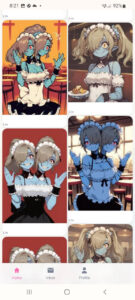
“Cute cartoon zombie girl, oversized glowing eyes, soft pastel colors, chibi proportions, playful undead expression, smooth shading, digital illustration style.”
What beginners learn:
-
AI zombie art isn’t only horror
-
style changes everything
-
“chibi,” “cartoon,” “pastel” produce soft results
Example Prompt 3 — “Cinematic Zombie Warrior”
Full Prompt:
“Undead warrior, cracked skull helmet, tattered armor, smoky battlefield background, dramatic shadows, intense cinematic lighting, 35mm lens, detailed atmospheric effects.”
What beginners learn:
-
atmosphere matters
-
backgrounds impact mood
-
lens and lighting increase realism
Example Prompt 4 — “Minimalist Zombie Art”
Full Prompt:
“Minimalist zombie silhouette, red moon background, bold contrast, flat colors, clean lines, graphic novel style.”
What beginners learn:
-
prompts don’t need to be long
-
simple descriptors can be powerful
-
style defines the output more than details
Each example teaches beginners something essential about prompt writing:
-
how to build structure
-
how to control style
-
how to shape emotion
-
how to design horror tone
-
how to mix realism with creativity
Zombie AI Art becomes a classroom for creative experimentation.
What Beginners Learn From Seeing AI-Generated Zombie Examples
Seeing prompts paired with images teaches beginners far more than any theoretical course.
1. They understand which details matter most
Some words drastically change the output (e.g., “cinematic,” “high detail,” “rotting texture”).
2. They learn the language of horror-style AI art
Zombie prompts have a unique style vocabulary.
Beginners absorb it by exposure.
3. They gain confidence
Even a complete beginner can say:
“I know what kind of prompt will create this effect.”
4. They become more creative
By mixing:
-
styles
-
lighting types
-
emotional cues
-
atmospheric layers
5. They learn how to transform any normal subject into a zombie
Zombie cat
Zombie schoolgirl
Zombie superhero
Zombie astronaut
It’s a fun, accessible way to practice prompt crafting.
Turning Prompt Knowledge Into Creative Skill
Prompt crafting is a real digital skill — and Zombie AI Art helps beginners build it.
Using learned prompt patterns, beginners can:
-
create entire zombie storylines
-
redesign characters in horror style
-
make Halloween posters
-
create social media horror art
-
build themed fan-art sets
-
generate content for AI art communities
The more examples they study, the more fluent they become in AI “visual language.”
This app helps turn curiosity into creative skill.
Zombie AI Art vs Other AI Apps — Comparison Table
| Feature | Zombie AI Art | Other AI Apps |
|---|---|---|
| Shows real prompts | ✔ Yes | ❌ Usually No |
| Easy for beginners | ✔ Very Easy | ⚠ Medium |
| Teaches prompt structure | ✔ Strong | ❌ Weak |
| Horror / Zombie specialization | ✔ Yes | ❌ No |
| Prompt inspiration library | ✔ Large | ⚠ Limited |
| Requires tech skills | ❌ No | ⚠ Sometimes |
Zombie AI Art is uniquely positioned as an educational AI art helper — not just an image gallery.
FAQ
1. Does Zombie AI Art generate images or only show prompts?
The app focuses primarily on showing real prompts that generated AI zombie images, making it a learning tool for beginners.
2. Can beginners use these prompts in other AI art apps?
Yes — prompts can be used as inspiration or copied into other AI generators.
3. Do I need experience to understand the prompts?
No. Even if you’ve never written a prompt before, the app’s examples make learning easy.
4. Is the app suitable for teens?
Yes, although the zombies are horror-themed, the app itself is beginner-friendly and safe.
5. Can users create their own zombie images using these prompts?
Absolutely — the prompts can be modified, expanded, or personalized to create new AI zombie art.
Conclusion
Zombie AI Art offers something rare in the AI art world:
learning through real examples.
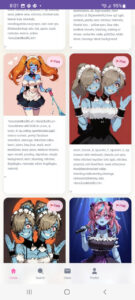
For beginners, seeing an image and the exact prompt behind it is transformative.
It feels like watching a magician reveal how the trick works — suddenly everything becomes possible.
Through this simple but powerful feature, the app helps beginners:
-
understand prompt structure
-
learn zombie/horror descriptors
-
gain artistic vocabulary
-
increase confidence
-
create better AI art
-
explore creativity without pressure
Zombie AI Art isn’t just another AI image app —
it’s a practical guide for anyone who wants to learn prompt crafting by observing real, cinematic, zombie-themed AI creations.
It proves that even the scariest images can become the simplest learning tools.