In a digital world filled with visual storytelling, short-form videos, and creative expression, face swap technology has evolved from a fun novelty into a mainstream creative tool. Whether you’re making TikTok videos, Instagram Reels, YouTube Shorts, or just sharing entertaining edits with friends, face swapping has become one of the easiest and funniest ways to transform images.
But in 2025, the game changed.
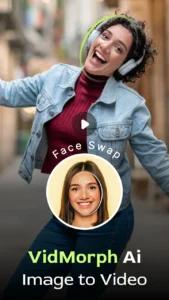
VidMorph AI emerged as one of the fastest, most realistic, and most user-friendly AI face swap apps, allowing anyone — beginners, influencers, creators, and casual users — to create stunning transformations in seconds.
Unlike older apps that often produce blurry, mismatched, or unnatural results, VidMorph AI uses advanced face detection, blending, and template-based AI generation to create smooth, high-quality face swaps that look like they were professionally edited.
Whether you want to swap your face into a luxury aesthetic, a gym athlete, a dancer, or simply perform a custom face swap between two photos, VidMorph AI makes it effortless.
This deep review explores how VidMorph AI works, its key features, why creators love it, and whether it truly delivers the best AI face swap experience in 2025.
Let’s dive in.
What Is VidMorph AI? A Complete Overview of the Fastest Face Swap App
VidMorph AI is an AI-powered face swap application designed to turn your photos into creative masterpieces using ultra-fast, realistic face-matching technology. The app transforms selfies and portraits using a wide variety of templates, including:
-
Gym transformations
-
Luxury lifestyle scenes
-
Dance-style edits
-
Fashion looks
-
Creative character templates
It also includes a custom face swap tool where you can choose any two photos and let the AI swap their faces smoothly and realistically.
Why VidMorph AI Is Exploding in Popularity
VidMorph AI isn’t just fast — it’s extremely accurate. The app automatically analyzes:
-
Facial angles
-
Skin tone
-
Lighting conditions
-
Head position
-
Eye placement
-
Facial expressions
…and blends everything seamlessly into the chosen template.
Users love it because:
-
It takes less than 2–3 seconds to generate results
-
The outputs look extremely realistic
-
It requires no editing skills
-
It’s designed with creators in mind
If you’ve ever struggled with apps that produce weird face shapes or mismatched skin tones, VidMorph AI feels like a huge upgrade.
How VidMorph AI Works: The Technology Behind the Realistic Face Swaps
To understand why VidMorph AI creates more natural results than most competitors, we need to explore how the underlying AI technology works.
1. Advanced Face Detection
The AI first scans the source photo for:
-
Face landmarks
-
Head angle
-
Facial symmetry
-
Expression alignment
This helps the app determine the correct adjustments.
What Is AI Prank Photo Generator?
2. Lighting & Color Matching
VidMorph AI evaluates:
-
The brightness of the original image
-
Shadow placement
-
Color temperature
-
Skin undertones
Then adjusts the template to match these conditions.
3. Facial Texture Blending
This is where VidMorph excels.
The AI:
-
Blends facial textures
-
Smooths edges
-
Adjusts skin tones
-
Maintains natural expression lines
-
Avoids plastic or “fake AI” appearance
4. Template-Aware Face Morphing
VidMorph’s templates (gym, luxury, dance, etc.) aren’t just static frames; they are dynamic environments.
The AI adapts the face to:
-
Body position
-
Lighting direction
-
Clothing style
-
Background elements
This makes the swap look like an authentic photo — not a simple overlay.
5. Super-Fast Rendering
The optimized AI pipeline means results are produced in a few seconds, which is crucial for creators making fast-paced social content.
VidMorph AI Key Features (Explained with Real Use Cases)
Let’s break down the most important features VidMorph AI offers — and how creators actually use them.
1. One-Tap Face Swap
This is the core feature.
Upload one photo → choose a template → get a perfect face swap instantly.
Great for:
-
TikTok edits
-
Pranks
-
Lifestyle transformation posts
-
Dating profile fun
-
Comedy content
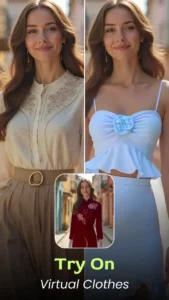
2. Template-Based Face Swap
VidMorph AI includes a wide variety of themed templates such as:
Gym Templates
Perfect for:
-
Fitness creators
-
Transformation videos
-
Motivational edits
These templates place your face onto muscular, athletic bodies — extremely popular in 2025 fitness memes.
Luxury Templates
Ideal for:
-
Lifestyle content
-
Glamour posts
-
Elegant transformations
These templates give users a high-fashion, wealthy aesthetic.
Dance Templates
Used for:
-
TikTok dance edits
-
Music-based content
-
Fun, expressive videos
You can instantly place your face onto dancers in motion.
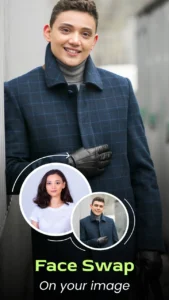
3. Custom Face Swap Between Two Photos
One of VidMorph’s most powerful features.
Simply pick:
-
Photo A
-
Photo B
…and the AI swaps the faces between them.
Perfect for:
-
Couple photos
-
Friends’ pranks
-
Memes
-
Celebrity swaps
-
Funny edits
This is one of the most shared features on Instagram and TikTok.
4. High-Quality Output
All results are:
-
High resolution
-
Clean and sharp
-
Ready for publishing
-
Social-media optimized
No pixelation — even after multiple edits.
5. Fastest Face Swap Engine
Many apps take 10–15 seconds to generate results.
VidMorph AI takes 2–4 seconds.
This speed matters for:
-
Bulk content creation
-
Trend videos
-
Time-sensitive posts
6. Easy Interface
VidMorph AI is designed for everyone:
-
No tools
-
No sliders
-
No settings
-
No advanced options
Just tap and go.
Creative Transformations: How Users Are Using VidMorph AI for Viral Content
VidMorph AI is especially popular among short-form creators. Here’s how they are using it:
1. TikTok Trends
Face swap transformation trends include:
-
“Me as a dancer”
-
“What I would look like as a fitness model”
-
“Luxury lifestyle version of me”
You’ve likely seen these going viral.
2. Comedy Content
Users swap faces for comedic effect:
-
Friends swapping faces
-
Couples switching roles
-
Putting your face on unexpected characters
This is a huge niche on social platforms.
3. Fitness Memes
The gym templates are extremely popular because they turn anyone into a muscular athlete. These edits often go viral in fitness meme communities.
4. Luxurious Lifestyle Edits
Users create:
-
Rich-aesthetic versions of themselves
-
Fashion magazine-style photos
-
Luxury cinematic clips
These work great for Instagram Reels.
5. Dance and Party Content
Creators place their faces on dancers or performers to produce fun, shareable videos without filming anything.
6. Celebrity Swaps
One of the most entertaining forms of content:
-
Put your face on a famous actor
-
Swap faces with your idol
-
Make a meme of yourself as a celebrity
VidMorph AI vs Other Face Swap Apps: Which One Is Truly the Best?
Let’s compare VidMorph AI with the most popular alternatives.
Competitors:
-
Reface
-
FaceMagic
-
FaceApp
-
CapCut face swap template
Here is the direct comparison:
| Feature | VidMorph AI | Reface | FaceMagic | FaceApp | CapCut Templates |
|---|---|---|---|---|---|
| Speed | ⭐⭐⭐⭐⭐ | ⭐⭐⭐⭐ | ⭐⭐⭐ | ⭐⭐⭐ | ⭐⭐⭐⭐ |
| Realism | ⭐⭐⭐⭐⭐ | ⭐⭐⭐⭐ | ⭐⭐⭐⭐ | ⭐⭐⭐⭐ | ⭐⭐⭐ |
| Templates | ⭐⭐⭐⭐⭐ | ⭐⭐⭐ | ⭐⭐ | ⭐⭐ | ⭐⭐⭐⭐⭐ |
| Ease of Use | ⭐⭐⭐⭐⭐ | ⭐⭐⭐⭐ | ⭐⭐⭐ | ⭐⭐⭐⭐ | ⭐⭐⭐⭐ |
| Custom Face Swap | ⭐⭐⭐⭐ | ⭐⭐⭐⭐ | ⭐⭐ | ⭐⭐ | ⭐⭐ |
| Creativity | High | Medium | Medium | Medium | High |
Why VidMorph Wins
-
More templates
-
Higher realism
-
Faster rendering
-
Cleaner blending
-
More user-friendly
-
Better creative versatility
VidMorph AI is built for creators who want maximum output with minimum effort.
Pros & Cons: What VidMorph AI Does Better (and Where It Can Improve)
Pros
-
Fastest face swap engine in 2025
-
Extremely realistic results
-
Large library of templates
-
Custom face swap between any two photos
-
User-friendly interface
-
Consistent lighting and skin tone matching
-
Ideal for TikTok, Reels, Shorts, and memes
-
Works even with low-quality photos
Cons
-
Best templates are in premium version
-
Requires good lighting in input photos
-
Some angles (extreme side profiles) may produce odd results
-
Lacks advanced editing options for professionals
Overall, the pros significantly outweigh the cons for average users and creators.
Who Should Use VidMorph AI? From Beginners to Pro Creators
VidMorph AI is designed to be used by virtually anyone — from casual users to professional content creators.
1. TikTok Creators
Perfect for:
-
Dance swaps
-
Gym transformations
-
Face-on-celebrity edits
-
Comedy swaps
2. Instagram Reels & Stories Creators
-
Lifestyle edits
-
Rich aesthetic content
-
Fun face swaps
-
Before/after edits
3. YouTube Shorts Creators
-
Meme edits
-
Reaction swaps
-
Character parodies
4. Casual Users
-
Prank edits
-
Couple swaps
-
Family fun
-
Friends’ jokes
5. Meme Creators
VidMorph AI is becoming a staple in meme communities because of its:
-
Speed
-
Simplicity
-
Versatility
Template Breakdown & Best Use Cases
| Template Type | Realism Level | Creativity | Best Use Case | Platforms |
|---|---|---|---|---|
| Gym Templates | ⭐⭐⭐⭐⭐ | ⭐⭐⭐⭐ | Fitness memes, transformation edits | TikTok, Shorts |
| Luxury Templates | ⭐⭐⭐⭐ | ⭐⭐⭐⭐⭐ | Glamour edits, aesthetic posts | |
| Dance Templates | ⭐⭐⭐⭐ | ⭐⭐⭐⭐ | Fun content, music videos | TikTok, Reels |
| Custom Face Swap | ⭐⭐⭐⭐⭐ | ⭐⭐⭐⭐⭐ | Pranks, memes, personal edits | All platforms |
FAQ Section
1. Is VidMorph AI safe to use?
Yes. Photos are processed securely and not stored unless you choose to save or share them.
2. How realistic are the face swaps?
Surprisingly realistic due to advanced blending, texture mapping, and lighting adjustment.
3. Is VidMorph AI free?
You can use basic features for free, but premium templates require a subscription.
4. Does it work on every photo?
Most frontal and semi-profile photos work perfectly. Extreme angles may reduce accuracy.
5. Can I use VidMorph AI for TikTok or Instagram content?
Absolutely — it’s one of the app’s main use cases.
6. What makes VidMorph AI different from Reface or FaceMagic?
Its speed, template variety, and realism are significantly better.
7. Does VidMorph AI support custom face swaps?
Yes — it allows swapping faces between any two photos.
The Future of Creative Face Swaps Is Here
VidMorph AI is more than a face swap app — it’s a creative transformation tool that makes high-quality visual storytelling accessible to anyone. With its lightning-fast AI engine, realistic facial blending, stylish templates, and beginner-friendly interface, VidMorph AI stands as one of the best face swap apps of 2025.
Whether you’re making TikTok trends, Instagram Reels, funny memes, romantic couple swaps, or luxury edits, VidMorph AI empowers your creativity with just one tap.
Face swapping is no longer a joke — it’s a new form of digital expression.
And VidMorph AI is leading the movement with speed, realism, and style.