The world of digital creativity is evolving at lightning speed, and 2025 has brought one of the most entertaining AI tools we’ve seen so far — VibeMe AI. Whether you’re a TikTok creator, Instagram meme maker, YouTube Shorts storyteller, or just someone who loves sending hilarious clips to friends, VibeMe AI is quickly becoming a must-have app.
Why?
Because it does something magical:
It turns any photo into a singing, animated video with stunning realism, lip-sync accuracy, and viral meme sounds — all with one tap.
This isn’t just an effect. It’s a transformation.
With VibeMe AI, sketches, portraits, old photos, selfies, digital art, and even children’s drawings become lively performers singing hit songs, viral memes, or iconic movie lines. The app merges entertainment with technology in the most seamless way possible — no editing, no technical skills, no learning curve.
In this in-depth guide, we’ll explore how VibeMe AI works, why it’s exploding across social media, how creators use it to go viral, and whether it truly offers the best AI singing photo experience in 2025.
What Is VibeMe AI? A Complete Overview of the Viral AI Singing Photo App
VibeMe AI is an AI-powered photo animation tool that transforms any image containing a face into a singing, talking, or lip-syncing video. It uses advanced AI models to analyze facial structure, simulate realistic movements, and synchronize the animation with music, meme audio, or movie quotes.
The app is designed to be:
-
Fun
-
Fast
-
Beginner-friendly
-
Social-media optimized
-
Suitable for both casual users and creators
Why VibeMe AI Went Viral
-
It’s incredibly easy: upload a photo → choose a sound → animate
-
The results are surprisingly lifelike
-
Kids, parents, meme creators, and influencers all use it
-
It works with ANY photo: selfies, drawings, old portraits
-
Trend sounds are updated frequently
-
Animations are expressive and entertaining
If you’ve ever seen a baby photo singing a rock song or a pet portrait lip-syncing a meme sound, there’s a good chance VibeMe AI made it.
How VibeMe AI Works: The Technology Behind Realistic Photo-to-Singing Animation
The reason VibeMe AI looks so natural is because it combines several advanced technologies working together.
Let’s break them down.
1. Facial Landmark Detection
When you upload an image, VibeMe AI scans:
-
Eyes
-
Eyebrows
-
Nose
-
Mouth shape
-
Chin structure
-
Head angle
-
Face symmetry
This allows the AI to build a precise digital map.

2. Lip Sync Generation
This is the heart of the animation engine.
The AI matches:
-
Mouth openings
-
Lip shapes
-
Phoneme timing
-
Breath patterns
…to the rhythm and syllables of the chosen sound — whether it’s a song, a meme sound, or a movie quote.
This results in highly accurate lip-syncing.
3. Head, Neck & Eye Movement
Static photos feel alive because the AI adds:
-
Subtle head tilting
-
Eye blinking
-
Brow movement
-
Micro-expressions
These tiny details create the illusion of real performance.
4. Emotion & Performance Mapping
Different sounds require different energy:
-
Rock songs → wide mouth movements
-
Meme audios → exaggerated expressions
-
Movie lines → precise timing
VibeMe AI adjusts expressions to match the mood.
5. Sound Matching & Timing
The app supports:
-
Hit songs
-
Meme audios
-
Viral TikTok sounds
-
Movie & TV quotes
Each sound has mapped motion data for enhanced realism.
6. Final Rendering
After the AI finishes:
-
Motion
-
Lip sync
-
Emotion mapping
…it exports a clean, crisp, social-ready animated video in seconds.
Key Features of VibeMe AI (Explained With Real Examples)
VibeMe AI comes packed with fun and powerful features that make it perfect for social media content creation.
1. Turn Any Photo Into a Singing Video
Your selfie becomes a rockstar.
Your child becomes a superstar.
Your pet becomes a meme legend.
Upload → select sound → animate → share.
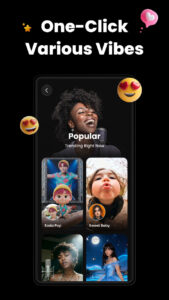
2. Meme & Viral Sound Lip Sync
Want to join a meme trend?
VibeMe AI includes:
-
Viral TikTok audio
-
Funny meme sounds
-
Internet-famous catchphrases
-
Comedy voiceovers
Perfect for quick viral content.
3. Hit Songs & Pop Classics
Choose from:
-
Pop
-
Rock
-
Hip-hop
-
Karaoke hits
-
Retro classics
Your photo will sing along with perfect lip-sync matching.
4. Movie & TV Quotes
Use iconic lines such as:
-
Comedy punchlines
-
Emotional quotes
-
Cartoon voices
-
Superhero one-liners
Ideal for creating fan edits or nostalgic content.
5. Animate Old Photos
Families love using VibeMe AI to:
-
Animate old portraits
-
Bring grandparents’ photos to life
-
Make baby pictures sing
-
Transform childhood sketches
These often get emotional reactions.
6. Share Directly to Social Platforms
Videos export perfectly for:
-
TikTok
-
Instagram Reels
-
YouTube Shorts
-
Snapchat
-
Facebook
-
Telegram & WhatsApp
Just one tap to share.
Sound Library: Hit Songs, Meme Sounds & Legendary Movie Quotes
The heart of VibeMe AI is its massive and constantly growing sound library.
Users can choose from three main categories:
1. Hit Songs
These are perfect for:
-
Birthday edits
-
Couple videos
-
Fun reels
-
Lip-sync challenges
Examples:
-
Pop hits
-
Rock anthems
-
Trending TikTok music
2. Viral Meme Sounds
This category includes:
-
Famous internet memes
-
TikTok viral audio
-
Sound effects
-
Joke audios
-
“Sigma male” audios
-
“Ohio meme” sounds
-
Baby talk memes
Creators use these to make instant viral clips.
3. Movie & TV Quotes
Perfect for storytelling and humor:
-
“I am your father.”
-
“Why are you running?”
-
“Say hello to my little friend!”
-
Cartoon voices
-
Anime lines
These bring nostalgia and excitement to animated photos.
Creative Use Cases: How Users Are Going Viral With VibeMe AI
VibeMe AI isn’t just a tool — it’s a content machine.
Thousands of creators use it for unique purposes.
1. Family Fun & Kids’ Videos
Parents animate:
-
Baby photos
-
Kids’ drawings
-
Family portraits
Seeing a child’s drawing sing a meme song never gets old.
2. Pet Singing Clips
Dog or cat singing?
Instant viral content.
3. Meme Creation
Memers use the app to create:
-
Instant reaction clips
-
“Talking photo” jokes
-
Singing meme remixes
-
Character lip-syncs
4. Emotional & Nostalgic Content
Some users animate:
-
Old family photos
-
Pictures of loved ones
-
Childhood sketches
This creates deeply emotional, shareable content.
5. Social Media Trends
Creators join:
-
Lip-sync challenges
-
Glow-up animations
-
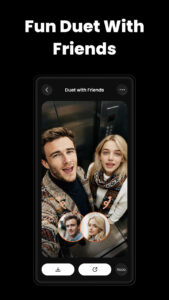
Animated duet trends
-
Comedy lip-sync battles
VibeMe AI makes these effortless.
VibeMe AI vs Other Singing Animation Apps: Which One Is Best in 2025?
Let’s compare VibeMe AI to its biggest competitors.
Competitors:
-
Wombo AI
-
Reface singing
-
HeyGen talking photos
-
Revive AI
Below is the performance comparison:
VibeMe AI vs. Competitors
| Feature | VibeMe AI | Wombo AI | HeyGen | Reface |
|---|---|---|---|---|
| Lip Sync Accuracy | ⭐⭐⭐⭐⭐ | ⭐⭐⭐⭐ | ⭐⭐⭐⭐⭐ | ⭐⭐⭐ |
| Realistic Animation | ⭐⭐⭐⭐ | ⭐⭐⭐ | ⭐⭐⭐⭐⭐ | ⭐⭐⭐ |
| Sound Library Size | ⭐⭐⭐⭐⭐ | ⭐⭐⭐⭐ | ⭐⭐ | ⭐⭐⭐ |
| Supported Photo Types | All faces (drawings too) | Selfies only | Real faces only | Selfies only |
| Speed | ⭐⭐⭐⭐⭐ | ⭐⭐⭐ | ⭐⭐⭐⭐ | ⭐⭐⭐ |
| Ease of Use | ⭐⭐⭐⭐⭐ | ⭐⭐⭐⭐ | ⭐⭐ | ⭐⭐⭐⭐ |
Verdict:
VibeMe AI leads in:
-
Speed
-
Sound variety
-
Facial compatibility
-
Simplicity
HeyGen offers more realism, but lacks the fun and meme library.
Wombo and Reface are older-gen tools.
Pros & Cons: What VibeMe AI Does Great (and Where It Can Improve)
Pros
-
Extremely fun for all ages
-
Very fast animations (1–3 seconds)
-
Massive audio library
-
Smooth and realistic lip sync
-
Works with drawings, sketches, pets, and real photos
-
Perfect for viral short-form content
-
Beginner-friendly
-
No editing skills needed
Cons
-
Some sounds require a subscription
-
Lip sync may be less accurate with low-resolution photos
-
Not ideal for professional video editors
-
Occasional over-exaggerated movement on certain images
FAQ Section
1. Is VibeMe AI safe to use?
Yes — the app processes photos securely and offers a clear privacy policy.
2. Does VibeMe AI work with any photo?
Yes. As long as the photo contains a visible face, it can be animated.
3. How realistic are the animations?
Surprisingly realistic — especially for singing and meme sounds.
4. Is VibeMe AI free?
It offers free basic animations, but premium sounds require a subscription.
5. Can I animate drawings or digital art?
Yes — this is one of the app’s best features.
6. Is it good for TikTok and Instagram?
Absolutely. It’s optimized for all social media formats.
7. Do I need editing skills?
Not at all. Everything is automated.
The Future of Fun, Creativity & AI Entertainment
VibeMe AI is more than a singing photo app — it’s a window into the future of AI-driven entertainment. In just a single tap, it transforms still images into expressive, musical performances that make people laugh, feel nostalgic, or instantly hit the share button.
Whether you want to create viral TikTok clips, bring old memories to life, animate drawings, or simply have fun with friends, VibeMe AI offers a magical experience that blends creativity, humor, music, and cutting-edge AI technology.
In 2025, content isn’t just made — it’s animated.
And VibeMe AI is leading that revolution, one singing photo at a time.