In today’s fast-moving digital world, video has become the king of content. Whether you’re posting on TikTok, building a YouTube channel, creating marketing clips, preparing classroom presentations, or simply experimenting with your imagination, video is now the most powerful way to communicate an idea. But there’s a problem — video creation traditionally demands time, skill, and complex tools.
Not anymore.
Quin AI, one of the most talked-about AI video generators of 2025, is redefining how creators bring their ideas to life. With the ability to turn text into video, animate images, and generate full scenes with cinematic quality — all without editing skills — Quin AI has quickly become the secret weapon of influencers, marketers, teachers, students, and storytellers.
Its promise is simple but revolutionary:
“Turn your imagination into a video — instantly.”
In this deep review, we explore how Quin AI works, why creators love it, how it compares to other AI video makers, and whether it’s truly worth using in 2025.
Let’s dive into the world where words become motion.
What Is Quin AI? The Text-to-Video Tool Taking Over 2025
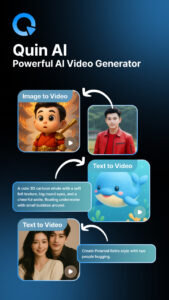
Quin AI is a smart AI video generator designed to turn text descriptions and images into high-quality animated videos in minutes. The entire purpose of the app is simplicity — making professional-looking video creation available to everyone, not just editors and filmmakers.
Why Quin AI Is Trending
-
It replaces complex editing with a single prompt.
-
It animates images with smooth movement and cinematic depth.
-
It offers templates that fit nearly any need: entertainment, ads, education, business, or storytelling.
-
It’s fast — extremely fast — allowing users to export videos in just a few taps.
-
It works beautifully for TikTok, Instagram, YouTube Shorts, Facebook Reels, and marketing campaigns.
From beginners to advanced creators, Quin AI offers something rare: powerful results with nearly zero learning curve.
Quin AI Features Explained (With Real Examples & Use Cases)
Let’s break down the features that make Quin AI such a powerful tool.
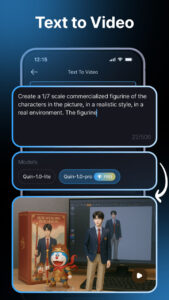
1. Text-to-Video Engine
This is Quin AI’s flagship strength.
Simply type what you want:
-
“A dreamy sunset over a futuristic city.”
-
“A girl walking through a neon cyberpunk street.”
-
“A motivational intro for a fitness channel.”
Quin AI instantly converts your text into:
-
Full scenes
-
Dynamic camera movements
-
Smooth transitions
-
Lighting effects
-
Character animations
-
Stylized color themes
It’s as if you’re scripting a movie and watching it materialize in front of you.
Use cases:
-
TikTok stories
-
Ads and promos
-
Inspirational videos
-
Fantasy scenes
-
Animated intros
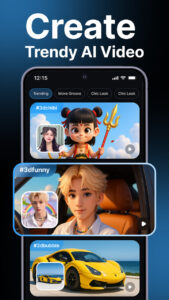
2. Image-to-Video Animation
Upload an image — Quin AI brings it to life.
It can:
-
Add motion to hair, water, lights, and shadows
-
Create gentle camera zoom-ins
-
Build animated backgrounds
-
Apply cinematic transitions
-
Turn static portraits into moving characters
This feature is perfect for:
-
AI portraits
-
Travel photos
-
Product photography
-
Social media reels
-
Artistic experiments
What once required After Effects or professional animators now takes seconds.
3. AI Templates (For Entertainment, Business, Education & More)
Quin AI includes ready-made templates such as:
-
Motivational quotes
-
Product showcases
-
Educational explainers
-
Character intros
-
Mini-commercials
-
Storytelling animations
Just choose a template, add your text or images, and Quin AI builds the entire video automatically.
Ideal for:
-
Content creators
-
Teachers
-
Students
-
Small businesses
-
Digital marketers
4. Cinematic Motion & Dynamic Transitions
Quin AI specializes in visually appealing movements:
-
Parallax depth
-
Smooth panning
-
Slow zoom-ins
-
Smooth fade transitions
-
Side scroll animations
-
AI-generated scene motion
These small details massively enhance video engagement.
5. Style Customization
Choose your aesthetic:
-
Retro VHS
-
Neon cyberpunk
-
Minimal clean
-
Cartoon animation
-
Cinematic film look
-
Corporate branding
-
Vibrant social-media style
Quin AI can match your theme or branding — making it excellent for businesses and influencers.
6. Fast Export & Sharing
With just a couple of taps:
-
Export videos in HD
-
Choose the correct aspect ratio
-
Share directly to Instagram, TikTok, WhatsApp, YouTube, etc.
The speed of processing makes it ideal for creators who want instant publishing.
7. Beginner-Friendly Interface
There are no timelines, no complex layers, no editing tools.
Just:
-
Write
-
Upload
-
Choose style
-
Export
It’s the simplest video creation workflow available today.
How Quin AI Turns Words Into Fully Animated Videos
The magic behind Quin AI lies in how it interprets text.
It uses:
-
Natural Language Processing to understand meaning
-
Generative video models to build scenes
-
AI motion engines to simulate camera movement
-
Visual synthesis models to create objects, environments, and characters
Example 1 — “A peaceful lake at sunrise with soft light movement”
Quin AI generates:
-
A lake scene
-
Orange sunrise glow
-
Gentle ripple animation
-
Slow cinematic pan
Example 2 — “A dramatic intro for a gaming channel with neon lights”
The app produces:
-
Bold text animation
-
Neon glowing aesthetics
-
Fast cuts and camera zooms
-
Pulsing background motion
Example 3 — “A romantic anime-style scene with falling petals”
You get:
-
Soft color palette
-
Petal animation
-
Shallow depth of field
-
Anime-style character motion
For beginners and pros alike, Quin AI simplifies the entire process into a one-sentence prompt.
From Images to Motion: Quin AI’s Image Animation Engine Explained
This feature is a game-changer.
Upload any photo — Quin AI identifies:
-
Objects
-
Background
-
Lighting
-
Emojis
-
Subjects
-
Possible motion paths
Then it decides how to animate the image naturally:
-
Water moves
-
Clouds shift
-
Eyes blink
-
Lights flicker
-
Hair flows
-
Camera glides forward
You can turn:
-
A selfie → Animated portrait
-
A landscape → Cinematic travel reel
-
A product photo → Marketing promo
-
A classroom project → Animated presentation
This ability is one of the reasons creators can’t stop talking about Quin AI.
Quin AI vs Other AI Video Makers: What Makes It Stand Out?
Let’s compare Quin AI to competitors like:
-
Runway ML
-
Pika Labs
-
Kaiber AI
-
CapCut AI
-
InVideo AI
Where Quin AI Wins
-
Simplicity: No learning curve
-
Speed: Faster rendering
-
Templates: Better beginner options
-
Image animation: More natural motion
-
Text-to-video: More accurate interpretation
-
User experience: Clean and friendly
Where Competitors Excel
-
Runway ML → advanced special effects
-
Pika → high-end stylized videos
-
Kaiber → artistic interpretations
-
CapCut → editing tools
But for everyday creators, Quin AI hits the perfect sweet spot between quality, speed, and ease.
Pros & Cons: Is Quin AI Really Worth It?
Pros
-
Turns text into video in seconds
-
Animates images beautifully
-
Zero editing skills required
-
Perfect for TikTok, Instagram, Facebook Reels
-
Huge library of styles and templates
-
Clean, beginner-friendly interface
-
Fast exporting and sharing
-
Ideal for business ads, school projects, and creative storytelling
Cons
-
Some templates are premium only
-
Not designed for professional film editors
-
Output depends on prompt quality
-
The free version has limitations
Overall, the pros significantly outweigh the cons for most creators.
Who Should Use Quin AI? Creators, Students, Marketers & More
Quin AI is versatile enough to fit many audiences:
1. Content Creators
Perfect for:
-
Trend videos
-
Intros
-
Aesthetic reels
-
Storytelling animations
-
Motivational content
2. Digital Marketers
Useful for:
-
Product videos
-
Promotional clips
-
Social ad campaigns
3. Educators & Students
Great for:
-
Presentations
-
Visual explanations
-
Classroom projects
4. Small Businesses
Ideal for:
-
Branding
-
Announcements
-
Animated ads
5. Anyone Who Wants to Create Videos Without Editing
Quin AI makes creativity accessible to everyone.
Quin AI Compared to Other AI Video Makers
| Feature | Quin AI | Runway ML | Kaiber AI | Pika Labs | CapCut AI |
|---|---|---|---|---|---|
| Text-to-Video | ⭐⭐⭐⭐⭐ | ⭐⭐⭐⭐ | ⭐⭐⭐ | ⭐⭐⭐⭐⭐ | ⭐⭐ |
| Image Animation | ⭐⭐⭐⭐⭐ | ⭐⭐⭐ | ⭐⭐⭐⭐⭐ | ⭐⭐⭐ | ⭐⭐ |
| Ease of Use | ⭐⭐⭐⭐⭐ | ⭐⭐⭐ | ⭐⭐⭐ | ⭐⭐⭐ | ⭐⭐⭐⭐ |
| Templates | ⭐⭐⭐⭐⭐ | ⭐⭐ | ⭐⭐ | ⭐⭐ | ⭐⭐⭐⭐⭐ |
| Creativity Level | High | Very High | High | Medium | Medium |
| Export Speed | Fast | Medium | Slow | Medium | Fast |
| Beginner-Friendly | Excellent | Medium | Medium | Medium | Excellent |
FAQ Section
1. What can Quin AI be used for?
Everything from TikTok videos to marketing ads, storytelling, anime scenes, business intros, and classroom presentations.
2. Is Quin AI good for TikTok and Instagram videos?
Absolutely. It’s built for social media trends and short-form storytelling.
3. Does Quin AI require editing skills?
No. It’s designed for beginners with a one-tap workflow.
4. Is Quin AI free?
It has a free version, but premium templates and HD exports require upgrades.
5. How accurate is Quin AI’s text-to-video generator?
Extremely accurate when you write clear prompts. It understands scenes, emotion, style, and actions.
6. Can Quin AI animate any photo?
Yes — most images can be animated with natural motion, depth, and effects.
7. Is Quin AI better than Runway or Pika?
For ease of use and quick content creation → Yes.
For advanced filmmaking → Runway and Pika are stronger.
Turning Imagination Into Reality
Creativity has entered a new era — one where ideas become videos as fast as you can type them. Quin AI isn’t just a video generator; it’s a creative partner that removes the friction of editing and unlocks pure imagination.
With its smooth text-to-video engine, powerful image animation, beginner-friendly templates, and lightning-fast exports, Quin AI is transforming how videos are made in 2025. Whether you’re a creator chasing trends, a marketer designing ads, a teacher preparing lessons, or someone who simply loves experimenting, Quin AI gives you the power to transform your imagination into stunning visuals.
This is the future of content creation — simple, fast, expressive, and open to everyone.