In a digital world where trends shift faster than ever, creativity is no longer just a talent — it’s a currency. Social media has become a stage where visuals define influence, personality, and relevance. And in 2025, one app has exploded across TikTok, Instagram, Facebook, and Snapchat for transforming simple photos into viral, cinematic, AI-powered masterpieces: Pose AI.
This app isn’t just another AI filter or face-swapping gimmick. It’s a full AI photo and video generator designed to create hyper-realistic transformations, from viral Polaroid AI portraits to cinematic snow scenes, birthday photo shoots, Ghostface Y2K edits, neon gas station videos, 3D action figure toys, and even playful prank videos like AI homeless man or AI arrest videos.
In this comprehensive Pose AI Review 2025, we dive deep into everything the app offers — its features, strengths, weaknesses, and real viral potential. Whether you’re a creator, influencer, business owner, or someone who just wants to make stunning content, this guide will show you exactly why Pose AI has become the ultimate AI photo & video generator of the year.
Let’s begin.
What Is Pose AI? A Quick Overview of the Viral AI Photo & Video Generator
Pose AI is a next-generation AI Photo to Video Maker designed for users who want to create stylish, professional, or viral content with minimal effort. Instead of learning photography or editing techniques, users simply upload a selfie or photo — and Pose AI does the rest.
What sets Pose apart is its ability to generate not just static photos but dynamic AI videos, complete with lighting, depth, movement, and cinematic effects. This combination of high-quality photos + AI video generation makes it one of the most versatile creative apps of 2025.
Why It’s So Popular
-
Viral trends spread fast on TikTok, and Pose AI provides the exact filters that creators need.
-
It offers social media–ready outputs for Instagram Reels, Facebook Stories, and TikTok edits.
-
Features like AI Business Headshots give it professional utility beyond entertainment.
-
Users love the diversity — you can become a superhero, mermaid, 90s kid, anime character, action figure, or get a Hollywood-style portrait in seconds.
Pose AI didn’t go viral by accident. It was engineered for social media.
Key Features of Pose AI (Deep Breakdown with Real-World Examples)
This section explores Pose AI’s biggest strengths — its filters and transformations. Every feature below is enhanced by large-scale AI models designed to mimic photography, cinematography, animation, and digital illustration styles.
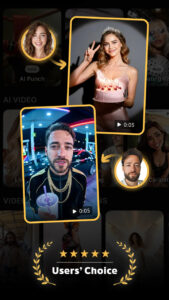
AI Birthday Photo Shoot
One of Pose AI’s most beloved tools, this filter transforms any selfie into a glamorous, luxurious birthday photo shoot.
Expect:
-
Studio lighting
-
Elegant decorations
-
Professional makeup effects
-
Clean backgrounds
-
Rich color grading
Creators use this to celebrate birthdays in a highly polished, aesthetic way — often without needing an actual studio. The results look like high-end photography.
Rain & Snow AI Photo Remake
Perfect for winter themes or emotional storytelling, these effects generate:
-
Soft cinematic rain
-
Snowy landscapes
-
Dreamy winter portraits
-
Moody dramatic scenes
Pose AI’s snow effect is so realistic that many viewers don’t realize the image is AI-generated. This feature went viral during winter holidays for holiday cards, couple photos, and emotional TikTok edits.
Viral Polaroid AI Filter
Vintage meets AI magic.
This filter recreates:
-
The look of 90s instant cameras
-
Soft retro tones
-
Realistic film borders
-
Grain textures
-
Authentic film imperfections
It’s massively popular on Instagram, where retro aesthetics dominate.
Ghostface Y2K Portrait Vibes
One of the app’s most viral features.
Pose AI transforms selfies into:
-
Y2K horror aesthetic
-
Ghostface-style portraits
-
Dark neon color palettes
-
Slasher-inspired looks
It blends creepy + aesthetic, making it perfect for TikTok trends, Halloween edits, or humorous content.
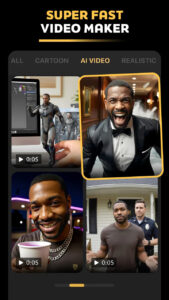
AI Video Generator
This is where Pose AI truly shines.
The app can turn a single image into a full AI video featuring:
-
Head movement
-
Eye tracking
-
Body animation
-
Cinematic effects
-
Cartoon or caricature styles
-
Gas station neon scenes
-
AI homeless man prank
-
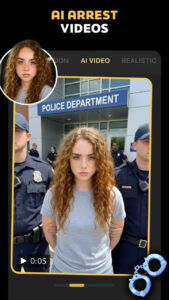
AI arrest prank
-
90s anime-style shots
-
Muscle enhancements
-
Bullet-time camera rotation
These videos are incredibly realistic and have been used by millions of creators for comedic skits, storytelling, and trend participation.
AI Action Figure Maker
This feature transforms your selfie into:
-
A customized action figure
-
3D toy-style renderings
-
Animated figure motion shots
This trend exploded in 2025 because users love seeing themselves as miniature toy figurines. Bloggers and gamers especially adore this filter.
AI Mermaid Filter
For fantasy lovers — this filter turns you into:
-
A mermaid princess
-
Ocean-themed portrait
-
Pearl-tone lighting
-
Shiny fantasy hair
-
Water reflection effects
It’s widely used for cosplay photos and cute TikTok transitions.
AI Business Headshots
This feature serves professional users:
-
Clean corporate backgrounds
-
High-quality lighting
-
Sharp outlines
-
Perfect LinkedIn-style portraits
It’s one of the most popular features for job seekers and freelancers.
Special Effects: Bullet Time, AI Hug Video, Neon Shots
Pose AI also includes:
-
Bullet time effect: rotating camera effect
-
AI hug video: AI-generated partner hug shot
-
Gas station neon shot: cyberpunk aesthetic
-
Zoom out and zoom in filters
These effects are engineered to capture attention in seconds — crucial for TikTok and Reels.
How Pose AI Creates Viral Content for TikTok, Instagram, and Reels
The secret behind Pose AI’s success lies in trend-sensitive design. It doesn’t just offer filters; it replicates visual styles that algorithms love.
Why Pose AI Content Goes Viral
-
Faces = Engagement
Human portraits statistically perform better on social platforms. -
Motion + Emotion = Retention
AI videos with movement keep viewers watching longer. -
Trendy Filters = Social Fuel
Every time a trend emerges (e.g., Polaroid, Y2K, Ghostface, winter scenes), Pose releases filters instantly. -
Share-Ready Formats
The app exports in perfect aspect ratios:
-
9:16 TikTok
-
1:1 Instagram
-
4:5 Portrait
-
High Visual Quality
Sharpness + color grading = longer watch time.
Creators often say:
“Pose AI makes content that looks like Hollywood on a budget of $0.”
Pose AI vs Competitors: Is It Really the Best AI Photo & Video Maker in 2025?
Let’s compare Pose AI with major alternatives:
Competitors:
-
Lensa AI
-
Remini
-
Reface AI
-
Vivid AI
-
Epik AI
What Pose Does Better
| Category | Pose AI | Competitors |
|---|---|---|
| Video Generation | ⭐⭐⭐⭐⭐ | ⭐⭐⭐ |
| Viral Effects | ⭐⭐⭐⭐⭐ | ⭐⭐⭐⭐ |
| Variety of Styles | ⭐⭐⭐⭐⭐ | ⭐⭐⭐ |
| Realism | ⭐⭐⭐⭐ | ⭐⭐⭐⭐ |
| Pricing | Moderate | Moderate / High |
| User Creativity | Very High | Medium |
| Prank Videos | ⭐⭐⭐⭐⭐ | ⭐⭐ |
Pose AI stands out because it offers the most dynamic creative range, from fantasy to professional to prank content.
Pros and Cons: What Pose AI Does Better (and Where It Needs Improvement)
Pros
-
Extremely high-quality outputs
-
Unique filters unavailable in other apps
-
Both photo + video generation
-
Perfect for TikTok & Instagram trends
-
Easy to use with one-tap effects
-
Includes professional headshots
-
Ideal for creators and influencers
-
Regular updates with new viral filters
Cons
-
Some effects require credits
-
Free version is limited
-
Heavy processing may slow low-end phones
-
Not all filters are equally realistic
Real User Experience: Is Pose AI Worth Downloading in 2025?
Based on user feedback from:
-
TikTok reviews
-
Reddit discussions
-
App Store ratings
-
YouTube creators
the overall sentiment is overwhelmingly positive.
What Users Love
-
“Best AI video generator I’ve ever used”
-
“The Polaroid filter looks insanely real”
-
“The action figure trend is genius”
-
“Better than Lensa and Epik combined”
Who Should Download Pose AI?
-
Content creators
-
TikTok & Instagram influencers
-
Photographers
-
Cosplayers
-
Business professionals
-
Anyone wanting viral-quality posts
Is Pose AI Safe and Legit?
Yes — it uses encrypted uploads, deletes temporary data, and follows app store privacy standards.
Feature Comparison Table: Pose AI vs Other Apps
| Feature | Pose AI | Lensa AI | Remini | Reface | Epik |
|---|---|---|---|---|---|
| AI Photo Generator | ⭐⭐⭐⭐⭐ | ⭐⭐⭐⭐ | ⭐⭐⭐⭐⭐ | ⭐⭐ | ⭐⭐⭐⭐ |
| AI Video Generator | ⭐⭐⭐⭐⭐ | ⭐⭐⭐ | ⭐⭐ | ⭐⭐⭐⭐ | ⭐⭐⭐ |
| Viral Filters | ⭐⭐⭐⭐⭐ | ⭐⭐⭐⭐ | ⭐⭐⭐ | ⭐⭐⭐ | ⭐⭐⭐⭐ |
| Professional Headshots | ⭐⭐⭐⭐ | ⭐⭐⭐⭐⭐ | ⭐⭐⭐⭐ | ⭐ | ⭐⭐⭐ |
| Creativity Level | Very High | Medium | Low | Medium | High |
| Trend Updates | Weekly | Monthly | Rare | Weekly | Monthly |
FAQ Section
1. Is Pose AI safe to use in 2025?
Yes. Pose AI follows standard app privacy protocols and does not store sensitive images after processing.
2. Does Pose AI really make viral TikTok videos?
Absolutely — the app is designed around trending styles, making its content ideal for virality.
3. What filters are the most popular?
Polaroid AI, Snow AI, Ghostface Y2K, AI Mermaid, AI Action Figure, AI Birthday Photoshoot.
4. Is Pose AI better than Remini or Lensa?
For video generation and viral effects, yes — Pose AI leads.
For ultra-clean portraits, Remini is slightly better.
5. Does Pose AI offer free effects?
Yes, but premium effects require credits.
6. Can Pose AI make professional headshots?
Yes — surprisingly good ones. Many users prefer it for LinkedIn.
Reflective & Inspirational
In a world where creativity drives visibility, Pose AI stands out as one of the most powerful tools of 2025. It bridges the gap between imagination and execution, offering cinematic quality to everyday users. Whether you want to go viral on TikTok, create artistic portraits, celebrate your birthday in style, or experiment with fantasy worlds, Pose AI makes it effortless.
Technology is evolving, and Pose AI represents a new era of AI-assisted storytelling, where anyone can be a creator, artist, or filmmaker with just one tap.
The future of content creation isn’t coming — it’s already here.
And Pose AI is leading the movement.