Opening Essay — When a Photo Becomes a Figurine
There is something universally charming about seeing ourselves in miniature form.
Perhaps it’s the childlike nostalgia it awakens —
the memory of small collectible toys lined up on a shelf,
the way we once imagined ourselves as animated versions of who we were,
or maybe the quiet delight of watching a simple sketch evolve into a character that carries a piece of our personality.
Whatever the reason, figurine art has never been “just cute.”
It’s storytelling in its smallest possible dimension.
In 2026, a new artistic wave surfaced — AI-powered figurine generators — and suddenly, anyone with a smartphone could turn a simple photo into a stylized, toy-like version of themselves. Among all these emerging tools, one name began circulating among Android creators, designers, and everyday users: NanaChan AI.
Not because it was just another AI photo filter.
Not because it was just fun.
But because it captured something deeper —
the ability to transform an ordinary selfie into a miniature character with soul, warmth, style, and identity.
This is not a standard “app review.”
This is a journey into how NanaChan AI reshapes personal creativity —
one figurine at a time.
The Artistic Philosophy Behind NanaChan AI
Before analyzing features or discussing technical strengths, one thing needs to be understood:
NanaChan AI is built on a philosophy of stylization, not imitation.
Most “AI portrait apps” try to recreate your face realistically, as if they’re striving for photographic enhancement.
NanaChan AI takes the opposite path:
It wants to reinterpret you — not reproduce you.
The figurine aesthetic is intentional:
-
oversized eyes
-
smooth skin textures
-
softened geometry
-
toy-like proportions
-
emotionally expressive stylization
This style is not childish.
It is a visual language that has existed across cultures:
anime mascot figurines, Funko-style collectibles, chibi characters, miniature sculptures, artisan doll craft.
The developers behind NanaChan AI understood something essential:
When you see a figurine version of yourself, you don’t feel judged —
you feel represented.
It’s the closest digital art form to the way a friend might draw you on a small sticky note — playful, personal, warm.
NanaChan’s core philosophy can be summarized in one sentence:
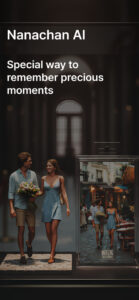
“Your face is a story. The figurine is the illustration.”
This mindset is what separates it from typical photo filters.
The Transformation Process — Behind the Scenes of Figurine Generation
Turning a selfie into figurine art may look simple from the outside —
upload a photo, tap generate —
but beneath the surface, NanaChan AI performs a series of detailed artistic operations.
Let’s take a closer look at the creative pipeline.
1. The Photograph — Your Raw Blueprint
Every transformation begins with a simple truth:
a figurine is only as expressive as the photo you upload.
NanaChan AI analyzes:
-
light direction
-
contrast levels
-
facial angle
-
silhouette clarity
-
hair boundaries
-
key emotional cues (smile, seriousness, playfulness)
Unlike enhancement apps that require “perfect lighting” for quality, NanaChan AI thrives on character rather than accuracy.
A slightly imperfect selfie?
It still becomes a stylized, expressive figurine.
2. The AI Sculpting Stage — Simplifying Without Losing Identity
Here’s where the magic begins.
The AI identifies:
-
the curve of your jaw
-
the relationship between eyes and eyebrows
-
the unique outlines of your hair
-
the expressive tilt of your lips
-
micro-expressions and emotional tone
Then it performs an artistic reduction:
-
smoothing facial complexity
-
rounding edges
-
enlarging key expressive features
-
condensing proportions
This is figurine logic —
a blend of miniature design principles and stylized character rendering.
It’s similar to how a sculptor simplifies reality into an iconic form.
3. Color & Texture Reconstruction — Painting the Miniature
After sculpting comes the digital painting stage:
-
skin tones become softer and more unified
-
shadows become gentler
-
highlights get slightly exaggerated
-
hair gains texture but retains simplicity
-
clothing colors get enriched for clarity
The rendering is not aiming for photorealism.
It aims for miniature charm —
the subtle plastic-like sheen that figurines often have.
4. The Figurine Rendering Engine — Giving the Character Life
This is the final step —
and it’s where NanaChan’s figurines come alive.
-
Eyes gain glossy depth
-
Hair becomes shape-consistent
-
Emotion becomes clearer
-
Lines become more defined
-
Silhouette becomes iconic
This is why a NanaChan figurine doesn’t just look like a toy —
it looks like a character from a world where you exist in miniature form.
Creative Tools — Building Your Own Miniature Universe
NanaChan AI is more than an art generator.
It is a creative playground where you can craft entire worlds around your figurine.
This section explores the tools not as features, but as parts of a universe you shape with your imagination.
Atmosphere: Designing the Mood
Every figurine needs a stage.
NanaChan offers atmospheres that shift the emotional tone:
-
dreamy pastels
-
cinematic lighting
-
bright and cute kawaii
-
cozy indoor rooms
-
toy-shelf diorama
-
nature-themed scenes
You are not just generating art.
You are placing your character in a world that amplifies its personality.
Styling Elements: Clothing, Colors & Expressions
Choose from:
-
outfit vibes
-
hair colors
-
accessory types
-
mood expressions
-
thematic palettes
Whether you want a cool cyberpunk figurine, a soft kawaii doll, or a playful cartoonish version of yourself — the app gives you tools that feel intuitive and joyful.
Scene Intent: Every Background Tells a Story
A good figurine is not just visually appealing —
it conveys intent:
-
playful
-
elegant
-
dramatic
-
whimsical
-
mysterious
NanaChan AI is surprisingly good at aligning the scene with the emotional tone of your figurine.
This is why creators say the app produces “images with personality” —
not just random backgrounds.
Real-World User Journeys — Three Stories That Define NanaChan AI
Instead of listing features, let’s explore how different people actually use NanaChan AI.
Story 1 — The Digital Creator
A content creator needs:
-
profile icons
-
stickers
-
thumbnails
-
cute character expressions
-
brand personas
With NanaChan AI, they can create:
-
figurine avatars for online identity
-
stylized representations of themselves
-
branded characters for social posts
-
YouTube thumbnails with figurine versions
The creator’s workflow becomes:
Idea → Photo → Figurine → Content
All in under five minutes.

Story 2 — The Casual User
Someone who just wants something fun.
They upload a random selfie.
They pick a cute scene.
They generate an adorable figurine.
They send it to a friend.
It becomes a digital gift —
a small character version of themselves that brings joy.
NanaChan AI shines because it requires zero skill to create something “worth saving.”
Story 3 — The Marketer or Designer
Small brands use NanaChan AI for:
-
character mascots
-
stylized marketing graphics
-
campaign visuals
-
figurine-themed product mockups
It’s a shortcut —
not to replace designers,
but to help brainstorm visuals quickly.
NanaChan AI becomes a creative assistant, not a competitor.
A Different Kind of Comparison — Where NanaChan AI Truly Leads
Instead of a table, let’s explore the landscape like a critic exploring an art gallery.
Most figurine apps fall into two groups:
Group 1 — Filter-Style Apps
They simply overlay effects on the face.
The result looks flat, artificial, often blurry.
Group 2 — Overly Realistic AI Portrait Apps
They try so hard to replicate realism that they lose the charm of figurines.
And then there’s NanaChan AI:
It doesn’t try to imitate.
It interprets.
It stylizes.
It transforms.**
Its figurines feel like characters that belong in a universe of their own —
not just photos wearing a cartoon mask.
This is what sets it apart:
-
deeper face modeling
-
emotionally expressive stylization
-
scene-aware background design
-
charming miniature proportions
-
polished lighting aesthetics
Ultimately:
**Other apps modify your face.
NanaChan AI reimagines it.**
Limitations & Honest Critique
No creative tool is perfect, and NanaChan AI is no exception.
It needs a clear, well-lit photo
The figurine engine struggles with blurry selfies.
Premium scenes require credits
Some users may find the credit system restrictive.
Limited multi-person support
It focuses primarily on single-subject figurines.
Scenes are stylized, not realistic
This is a feature for most users, a limitation for a few.
But despite these, the core output quality is consistently strong —
more so than 90% of similar apps.
The Emotional Impact — Why Figurine Art Matters
A figurine is not an edit.
It is an interpretation.
It takes the essence of you —
your smile, your energy, your personality —
and distills it into a miniature form that feels…
-
lovable
-
playful
-
personal
-
expressive
Figurine art reminds us that we can be both:
realistic adults and imaginative children.
NanaChan AI bridges those worlds beautifully.
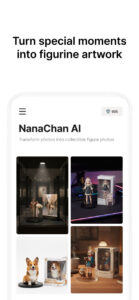
A Modern Tool for Imagination
NanaChan AI is not a utility.
It is a creative companion.
It takes one photograph
and turns it into a small universe
where you exist as a character —
stylized, charming, expressive, and unmistakably you.
For Android creators, designers, influencers, and casual users,
it is one of the most delightful creative tools of 2026.
If you’ve ever wanted to see yourself as a figurine,
a character
a miniature story
NanaChan AI is the doorway.