Artificial intelligence is becoming increasingly multimodal.
Users no longer interact with AI through text alone — they upload images, record voice notes, share video clips, submit PDFs, and expect their assistant to understand all of it instantly.
This shift has created a new frontier: Multimodal Retrieval-Augmented Generation (RAG).
Traditional RAG systems allow an AI model to retrieve relevant text documents before generating a response. But modern AI applications demand more. They require models that can analyze:
-
Text (documents, emails, notes)
-
Images (photos, screenshots, diagrams)
-
Audio (voice commands, recorded interviews, call logs)
A multimodal RAG system is no longer a niche feature — it is becoming the foundation of next-generation intelligent applications, powering:
-
Smart personal assistants
-
Document & media search engines
-
Knowledge-based enterprise tools
-
Autonomous agents
-
Creative workflow systems
In this guide, we will walk through how to build a real multimodal RAG app — a system capable of retrieving text, image, and audio context and using that context to generate intelligent, grounded responses.
Whether you’re a developer, researcher, or builder, this is your roadmap to creating smarter, more context-aware AI systems.
What Is Multimodal RAG and Why It Matters in 2026
Retrieval-Augmented Generation (RAG) is the foundational technique behind many modern AI applications. It works by retrieving external knowledge and feeding it into an LLM before generating a response.
Standard RAG:
-
Input → Text search → Retrieve text → Generate answer
Multimodal RAG:
-
Input → Search text + image + audio → Retrieve multimodal context → Generate answer
But why is multimodal RAG becoming essential?
1. Users Expect AI to Understand Their World
People now interact through a mixture of:
-
voice
-
images
-
documents
-
screenshots
-
videos
A text-only AI feels outdated.

2. Images Carry Information That Text Can’t
A product photo, a medical scan, a chart, a diagram — these contain critical meaning.
Multimodal retrieval unlocks deeper understanding.
3. Audio Is Becoming the Preferred Input
Voice-based interfaces (smartphones, assistants, cars) rely on audio retrieval.
4. Enterprises Store Knowledge in Many Formats
Real-world datasets include:
-
PDFs
-
slides
-
scanned images
-
audio meetings
Multimodal RAG is the only way to build a unified knowledge system.
5. Agents Need Multimodal Understanding
Future autonomous agents cannot function with text alone.
They must interpret visual and auditory data exactly like humans.
Architecture of a Multimodal RAG App (Text + Image + Audio Retrieval Pipeline)
Here’s the high-level architecture of a multimodal RAG system:
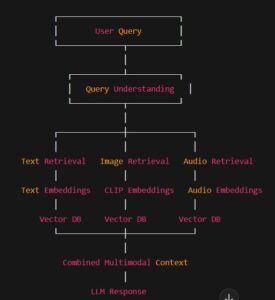
This system has five critical components:
1. Embedding Models
Different modalities require different embedding models:
| Modality | Model Example | Strength |
|---|---|---|
| Text | BERT, E5, Mistral embeddings | Semantic understanding |
| Image | CLIP | Cross-modal alignment |
| Audio | Whisper, Wav2Vec | Strong audio feature extraction |
2. Vector Database
Stores embeddings for:
-
text chunks
-
image embeddings
-
audio embeddings
Examples:
Chroma, Pinecone, Weaviate, Milvus
3. Indexing Pipeline
Preprocessing + embedding + storage.
4. Query Routing
The system determines whether the query requires:
-
text search
-
visual search
-
audio search
-
or all of them
5. Response Generator
Uses the retrieved multimodal context to produce grounded, high-quality answers.
H2 — Step-by-Step: Setting Up Your Multimodal Embedding Pipeline
Let’s walk through how to build the core of your multimodal RAG system.
Step 1 — Prepare Your Data
You need a dataset containing:
-
Text documents (PDFs, notes, articles)
-
Images (screenshots, photos, charts)
-
Audio files (voice notes, recordings)
All must be converted into embeddings.
Step 2 — Build Text Embeddings
Example tools: Sentence Transformers, Mistral embeddings, E5-large
Pipeline:
-
Chunk text into smaller segments (200–400 tokens)
-
Generate embeddings
-
Store in vector DB
Pseudo-code:
from sentence_transformers import SentenceTransformer
import chromadbmodel = SentenceTransformer(“intfloat/e5-large”)
db = chromadb.Client()emb = model.encode(text_chunk)
db.add(embedding=emb, metadata={“source”: file})
Step 3 — Build Image Embeddings
Use CLIP or similar models.
from PIL import Image
import torch
import clipmodel, preprocess = clip.load(“ViT-B/32”)
image = preprocess(Image.open(“photo.png”)).unsqueeze(0)with torch.no_grad():
emb = model.encode_image(image)
Store embeddings.
Step 4 — Build Audio Embeddings
Use Whisper or Wav2Vec for audio feature extraction.
import torchaudio
import librosa
from transformers import Wav2Vec2Model, Wav2Vec2Processor
Convert audio → embedding → store.
Step 5 — Store All Embeddings in a Unified Vector DB
Store everything under tagged namespaces:
-
text
-
image
-
audio
This enables multi-vector search.
Implementing Multimodal Retrieval with LlamaIndex or LangChain
Both frameworks support multimodal search.
LlamaIndex Multimodal Pipeline
LlamaIndex allows:
-
multimodal nodes
-
multimodal retrievers
-
cross-modal search
-
unified query routing
Example setup:
from llama_index.multi_modal_retriever import MultiModalRetriever
LangChain
LangChain supports:
-
CLIP search tools
-
audio search
-
text search
-
hybrid retrieval pipelines

Building the Response Generator: From Retrieved Context to Intelligent Output
Once your multimodal data is retrieved, you need an LLM to synthesize the answer.
Key Techniques:
-
Weighted fusion (text vs image vs audio importance)
-
Prompt-based context formatting
-
Chain-of-thought expansion
-
Multimodal grounding
Example Prompt Template
You are a multimodal AI. Use the text, image descriptions, and audio transcripts to answer the user’s question.
Deployment: Turning Your Pipeline Into a Real App
You can deploy your app with:
Backend: FastAPI Example
uvicorn main:app –reload
Frontend Options:
-
Streamlit
-
Next.js
-
React
-
Flutter
Deployment Tips:
-
Cache embeddings
-
Store preprocessed versions
-
Use GPU for real-time performance
-
Optimize your vector DB indexes
Best Models for Multimodal RAG
| Modality | Best Model | Why It Works |
|---|---|---|
| Text | E5-large | Excellent semantic retrieval |
| Image | CLIP | State-of-the-art cross-modal alignment |
| Audio | Whisper | High-quality speech understanding |
| LLM | GPT, Claude | Strong grounding and synthesis |

FAQ Section
1. What’s the difference between multimodal RAG and standard RAG?
Standard RAG uses only text; multimodal RAG supports image and audio retrieval.
2. What vector database should I use?
Pinecone for scale, Chroma for local use, Weaviate for hybrid workloads.
3. Do I need a huge LLM for multimodal RAG?
No — even small models work well when retrieval is strong.
4. Can I deploy this on a laptop?
Yes — especially with smaller embedding models.
5. Is multimodal RAG required for agents?
Absolutely — advanced agents rely on multimodal context.
Conclusion
Multimodal RAG is the missing capability that transforms AI from text-only tools into fully context-aware intelligence systems. By combining text, image, and audio retrieval, we can build models that understand the real world in a more human-like way.
This tutorial gave you the complete roadmap to build your own multimodal RAG system — from embeddings to retrieval to generation and deployment.
The future of AI is multimodal.
And now, you have the tools to build it.