There is a moment every creator recognizes —
the moment an idea feels alive.
A color palette flashes in your mind.
A character stands in your imagination.
A thumbnail, a moodboard, a product mockup, a poster concept —
something sparks, but you don’t yet know how to bring it into the real world.
For years, creators depended on heavy desktop apps, expensive subscriptions, complicated interfaces, and endless experimenting just to translate that spark into something visual.
But in 2026, mobile creativity is finally catching up to desktop power —
and Lexica AI is leading the shift.
Lexica isn’t just another AI art generator.
It’s a visual engine for the imagination, designed to work instantly, beautifully, and intuitively on Android.
You open the app, type a thought, choose a style, press a button…
and in seconds, four variations of your idea bloom into existence.
It feels magical —
but the magic is grounded in fast models, smart ratios, clean controls, and an extremely creator-friendly interface.
But let’s go deeper.
Why this app?
Why now?
Why for Android creators?
And why is Lexica considered one of the best AI art apps of 2026?
Let’s break it down — beautifully, thoughtfully, and with real depth.
What Makes Lexica AI Stand Out? A New Standard for Mobile AI Art Generation
There are dozens—maybe hundreds—of AI art generators today.
Some look pretty.
Some offer complex features.
Some are fast.
Some are powerful.
But very few unify three essential qualities:
Speed
Style Diversity
Creative Control
Lexica brings all three directly to your Android device.
1) Instant Rendering for Real Creators
Most mobile AI apps lag, stutter, or take long to generate images.
Lexica, however, feels immediate.
You write a prompt…
You tap generate…
And before you even lift your finger off the screen, the app is already producing results.
For creators who produce content daily — YouTubers, marketers, designers, online sellers, storytellers — speed is not a luxury.
It is oxygen.
2) A Minimalist Design That Gives Space to Your Ideas
Lexica’s UI is intentionally simple:
white space, clean buttons, smart placement.
You are not fighting menus.
You are not overwhelmed by options.
You are creating.
3) Built with Creators in Mind
The app doesn’t just generate images.
It supports a creative workflow:
-
History of every image
-
Favorites gallery
-
Clean export
-
Model switching
-
Aspect ratio presets
-
4-image variations each generation
This is not an app that happens to generate art.
It is an app designed for people who create.
Fast Text-to-Image Generation: Turn Thoughts Into Art in Seconds
Time is the enemy of creativity.
When inspiration strikes, anything that slows you down — menus, slow rendering, complicated prompts — can kill an idea before it has a chance to grow.
Lexica AI solves this with its prompt → art in seconds engine.
Let’s break down the experience:
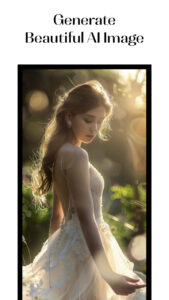
Step 1: You think.
A character with neon hair.
A cyberpunk skyline.
A kawaii-style dessert.
A dark fantasy castle.
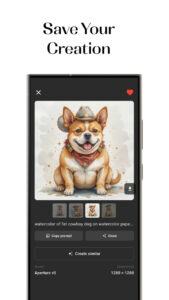
A watercolor corgi wearing a cowboy hat.
Step 2: You write one sentence.
Lexica doesn’t require long prompts.
Its models understand short, natural description.
Step 3: You tap “Generate.”
Only once.
Not twice.
Not with five menu layers.
Step 4: Four variations appear.
Not one.
Not two.
Four.
This is one of Lexica’s biggest advantages: you can choose, compare, pick your favorite direction, and even regenerate based on the style you liked most.
Why it matters
Most mobile AI apps generate one image per prompt — if it’s off, you try again.
Lexica gives you creative breadth, not just output.
One idea becomes four possibilities.
Four possibilities become infinite directions.
This is how inspiration grows.
Multiple AI Models for Any Creative Style
One model cannot satisfy all artistic needs.
Portrait artists need something soft and expressive.
Anime lovers need clean lines and stylized features.
Marketers need crisp product renders.
Designers need accurate logo geometry.
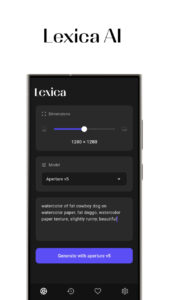
Lexica solves this by offering multiple AI models, each optimized for different purposes:
Portrait Model
Ideal for expressive faces, realistic lighting, subtle emotion.
Anime Model
Bright colors, clean outlines, stylized proportions.
Logo & Icon Model
Sharp shapes, symmetry, branding visuals.
Poster Model
Bold compositions, text-friendly structure.
Concept Art Model
Creative, imaginative, cinematic.
Product Photography Model
Perfect for marketing, e-commerce, mockups.
Wallpaper & Lock Screen Model
Ready-made aspect ratios for home screen & lock screen.
Each model is more than a “style filter.”
It has been trained to understand the language of that art form.
This means when you switch models, you are not just changing a style —
you are changing the physics, the emotion, and the composition of the final image.
Smart Ratios & Precision Controls: Perfect for Creators, Marketers & Designers
If you’re a creator, you know the pain:
-
Instagram prefers tall ratios
-
YouTube needs wide thumbnails
-
Stories demand 9:16
-
Wallpapers need very specific sizes
Most mobile AI apps ignore this reality.
Lexica does not.
It offers smart aspect ratios, including:
-
1:1 (Instagram feed, logos)
-
4:5 (portraits)
-
3:4
-
9:16 (TikTok, Reels, YouTube Shorts)
-
16:9 (YouTube thumbnails)
-
Ultra-wide options
Why this matters
Creators do not have time to crop and resize endlessly.
Lexica gives you output that is:
-
ready for publishing
-
ready for branding
-
ready for social media
-
ready for clients
No editing.
No Photoshop.
No extra steps.
You generate → you post.
Pure simplicity.
Variations, Favorites & History: A Workflow Made for Creativity
Most AI art apps produce an image and forget it.
Lexica remembers everything.
History Screen
Every image you ever generated sits in a clean timeline.
You can:
-
rename images
-
re-create them
-
modify them
-
regenerate new versions
This is essential for creators working on:
-
character development
-
logo evolution
-
style exploration
-
brand identity
-
visual storytelling
Favorites (Likes Gallery)
You can “heart” any image to save it in a curated collection.
This is perfect for inspiration boards or picking final versions.
4 Variations per Prompt
Each generation is a mini exploration gallery.
Ideas don’t come out flat —
they come out alive, with multiple possibilities.
What You Can Create With Lexica AI (Real Use Cases)
Lexica AI isn’t just for fun.
It is a toolbox for modern creators:
Wallpapers & Lock Screens
Personalize your phone instantly.
Avatars & Profile Pictures
Stylized, professional, unique.
Posters & Covers
For social media, books, events.
Logos & Branding Concepts
Quick prototypes for designers.
Product Shots & Marketing Graphics
Perfect for small businesses.
Character Design
For games, comics, storyboards.
Tattoo Ideas
Generate original tattoo concepts.
YouTube Thumbnails & Story Covers
Creators love this —
fast style, perfect ratio, strong colors.
Concept Art & Moodboards
Writers, filmmakers, and designers use Lexica to visualize ideas before production.
This makes Lexica more than an app.
It is a visualization engine for imagination.
Lexica AI vs Other Mobile AI Art Generators
| Feature | Lexica AI | Other Apps |
|---|---|---|
| Generation Speed | Very fast | Slow–Medium |
| Variations | 4 per prompt | 1–2 |
| Models | Multiple styles | Limited |
| UI/UX | Minimal & clean | Often cluttered |
| Ratios | Full creator ratios | Basic |
| History | Yes | Rare |
| Favorites | Yes | Limited |
| Creator Workflow | Strong | Weak |
| Output Quality | High & consistent | Inconsistent |
Lexica wins because it wasn’t built as a “fun AI toy.”
It was built as a creator’s tool.
FAQ Section
1. Is Lexica AI free to use?
Yes — basic features are free. Premium options may unlock higher-quality outputs or faster processing.
2. Do the images look professional?
Absolutely. The models produce sharp, stylish, high-quality images suitable for creative projects.
3. Can I use Lexica for commercial work?
This depends on the app’s specific licensing terms. Always check the usage rights inside the app.
4. Does Lexica work offline?
Generation requires an internet connection because the AI models run on cloud servers.
5. Is Lexica good for beginners?
Yes — it has one of the cleanest, simplest interfaces among AI art apps.
Conclusion
Creativity has always been about expression.
But in the past, expressing your vision required:
-
knowledge
-
tools
-
software
-
hardware
-
time
Lexica AI removes those barriers.
It gives creators — beginners, professionals, dreamers — the ability to turn imagination into art at the speed of thought.
You type.
Lexica understands.
Art appears.
In a world where ideas move fast, Lexica moves faster.
It is intuitive, powerful, beautifully designed, and perfect for Android users who want real creative control without the complexity.
If you’re a creator in 2026, this is more than an app.
This is your new artistic partner.