Imagine having a personal assistant in your pocket — one that understands your language, manages your tasks, answers your questions, organizes your day, translates conversations in real time, and responds instantly every time you speak to it. Now imagine all of that inside a lightweight Android app that won’t drain your battery or slow down your phone.
This is exactly what Ovia AI offers.
Designed as a fast, smart, and multilingual AI assistant, Ovia aims to become your daily productivity partner — helping you stay organized, informed, and connected. Whether you want quick answers, reminders, voice-controlled convenience, smart translations, or natural conversations, Ovia AI is built to simplify your day with speed and intelligence.
Unlike many AI apps that feel slow, heavy, or complicated, Ovia focuses on lightweight performance, personalized chats, and hands-free assistance, making it perfect for everyday use — from busy professionals to students and casual Android users.
In this full review, we dive deep into everything Ovia AI offers — how it works, what makes it special, and how it can fit into your daily routine.
Let’s explore your new AI-powered personal assistant.
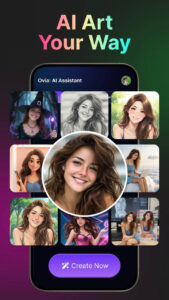
Why does seeing yourself in a fantasy outfit feel powerful?
What Is Ovia AI? A Modern AI Assistant Built for Speed & Simplicity
Ovia AI is a modern personal assistant app designed to bring the power of artificial intelligence into your daily life — without unnecessary complexity. Many AI apps today rely on large, resource-heavy models that drain battery life, lag on older devices, or require constant internet access. Ovia takes a different approach.
Ovia AI focuses on three core strengths:
-
Fast performance — optimized for quick responses
-
Lightweight processing — works smoothly on most Android devices
-
Multilingual capabilities — supports multiple languages in chat & translation
This makes Ovia much more than a chatbot. It’s a digital companion that understands what you want, adapts to your preferences, and helps you stay productive throughout the day.
What makes Ovia different from other AI assistant apps?
-
It’s lighter than most AI apps
-
It’s faster than many cloud-based assistants
-
It supports multilingual voice & text
-
It can generate images from text (creative mode)
-
It offers smart daily assistance
-
It blends personal organization with AI conversation
Whether you’re looking for entertainment, productivity, language support, or personal organization, Ovia AI adjusts itself to your needs — instantly.
Personal Assistant Features: Tasks, Reminders & Daily Scheduling
One of Ovia AI’s biggest strengths is its ability to help you manage your day like a real personal assistant.
✔ Task Management
Create tasks using voice or text:
-
“Remind me to call mom at 6 PM.”
-
“Add ‘buy groceries’ to my to-do list.”
-
“Plan a study session tomorrow morning.”
Ovia organizes everything neatly and keeps track of your upcoming activities.
✔ Smart Reminders
Never forget another meeting, event, or errand.
Ovia sends structured reminders at the exact moment you need them.
✔ To-Do Lists
Ovia helps you build daily or weekly to-do lists with simple commands.
✔ Daily Scheduling
Perfect for:
-
students managing assignments
-
professionals handling meetings
-
parents juggling busy routines
-
freelancers organizing their workflow
A Real Scenario
Imagine waking up and saying:
“Ovia, what’s on my schedule today?”
Within seconds, Ovia summarizes your day clearly and intelligently — better than many standard calendar apps.
This transforms your morning into a smooth, organized start.
Smart AI Chatbot: Contextual, Friendly & Human-Like Conversations
Ovia’s chatbot is not a simple question-and-answer robot.
It uses an advanced conversation model that:
-
remembers context in real time
-
adapts to your tone and style
-
responds naturally
-
provides explanations and insights
-
offers creative help
-
keeps conversations friendly and engaging
You can chat with Ovia about:
-
daily life
-
personal interests
-
fun topics
-
news
-
general knowledge
-
emotional support
-
productivity tips
-
studying or learning
Examples of what you can ask:
-
“Help me write a message to my boss.”
-
“Give me a 3-day workout plan.”
-
“Explain quantum physics simply.”
-
“Tell me a joke.”
-
“Create a bedtime story.”
-
“How do I cook pasta?”
Ovia responds immediately and with clarity.
It is both a friend and a smart assistant.
Voice Control & Hands-Free Assistance
Hands-free assistance is where Ovia shines.
Instead of typing or tapping, you can simply speak.
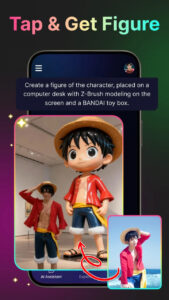
Why this is useful:
-
driving (ask for navigation help)
-
cooking (ask for recipes)
-
working out (hands-free commands)
-
multitasking anywhere
Examples:
-
“Ovia, remind me in 10 minutes to check the oven.”
-
“Translate this sentence to Spanish.”
-
“Ovia, what’s the weather like today?”
-
“Play calming music.”
Ovia listens, understands, and responds instantly — offering a smooth, effortless experience.
This puts it in the same category as Google Assistant or Siri, but with more conversational intelligence and less device drain.
Multilingual Translation & Real-Time Language Support
One of Ovia AI’s strongest features is its multilingual translation engine.
You can:
-
translate conversations in real time
-
switch between voice and text
-
chat in multiple languages
-
practice language learning
-
speak naturally and have Ovia interpret
Perfect for:
-
travelers
-
bilingual speakers
-
international students
-
people learning a new language
-
everyday messaging with foreign friends
Supported Languages Include:
-
English
-
Spanish
-
French
-
German
-
Arabic
-
Chinese
-
Japanese
-
Korean
-
Hindi
-
and more
Ovia can even interpret tone, formality, and context — making translations feel more natural, not robotic.
This alone makes it one of the most useful tools for global communication.
Lightweight, Fast & Personalized: Why Ovia Works Great on Any Android Device
Heavy AI apps can be slow, battery-hungry, and laggy — especially on mid-range or older Android devices.
Ovia’s biggest technical advantage is that it’s:
-
lightweight
-
fast
-
optimized for low battery usage
-
responsive on low-end devices
This makes it one of the best AI assistants for budget phones or users who want speed without sacrificing performance.
Personalization Features
You can customize:
-
Ovia’s voice
-
tone of responses
-
speaking style
-
assistant “personality”
-
interface preferences
This makes Ovia feel truly personal — more like a companion than a tool.
Ovia AI vs Traditional Assistant Apps
| Feature | Standard Assistants | Ovia AI |
|---|---|---|
| Speed | Moderate | Very fast |
| Weight | Heavy | Lightweight |
| Multilingual Chat | Basic | Real-time + natural |
| Task Management | Limited | Smart + AI-enhanced |
| Voice Control | Good | Adaptive + smooth |
| Translation | Good | Context-aware |
| Personalization | Low | High |
| Image Generation | Rare | Built-in |
| Battery Usage | High | Low |
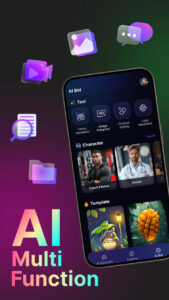
FAQ Section
1. Is Ovia AI free to use?
Ovia offers many free features. Some advanced tools may require subscription upgrades, depending on your region and usage.
2. Can Ovia replace Google Assistant or Siri?
For AI chat, translation, conversations, and creative responses — yes.
For deep system-level commands (like setting system alarms), it may work alongside them.
3. How accurate is Ovia’s translation engine?
It’s highly accurate for everyday use and supports natural phrasing rather than robotic, word-for-word translation.
4. Does Ovia work well on older Android phones?
Yes — the app is optimized for speed and low resource usage.
5. Can Ovia help with studying or work tasks?
Absolutely.
It can summarize text, explain topics, create study plans, write messages, and help manage your schedule.
Conclusion
In a world filled with complex AI apps and heavy digital assistants, Ovia AI stands out as a fast, simple, and multilingual personal assistant that works beautifully on any Android device.
It helps you:
-
manage your day
-
stay organized
-
communicate across languages
-
chat naturally
-
get instant answers
-
translate on the go
-
create reminders
-
use voice commands
-
generate images
-
personalize your experience
Whether you’re a student, traveler, professional, or everyday user — Ovia AI becomes the smart companion you always wished your phone had.
With its blend of speed, intelligence, and versatility, Ovia AI is one of the best productivity apps available today.
If you’re looking to stay productive, connected, and organized in 2026, Ovia AI is absolutely worth trying.