Every creator knows the feeling:
You see something in your mind —
a surreal painting, a cinematic moment, a dreamlike scene —
and wish you could turn it into a visual masterpiece.
But most of the time, real creation requires:
-
advanced editing skills
-
powerful desktop tools
-
paid software
-
hours of practice
For users on Android devices, this has always felt even harder. Mobile apps were often limited, weak, or missing crucial features.
But today, AI is rewriting the rules.
VidMind AI, an all-in-one Android creativity app, empowers anyone to turn ideas into high-quality art, videos, and enhanced photos — instantly, effortlessly, and without technical skills. With tools like Text-to-Image, Text-to-Video, and powerful Photo Enhancer, VidMind becomes a complete creative studio that fits in your pocket.
This article explores how VidMind AI enables users of all levels — beginners, teens, artists, and content creators — to produce stunning visuals directly from their Android phones.
Why VidMind AI Matters for Android Users
Android users make up more than 70% of global smartphone owners, yet most cutting-edge AI tools are:
-
desktop-based
-
complicated
-
expensive
-
not optimized for mobile
-
not beginner-friendly
VidMind AI changes this by delivering:
-
high-performance AI models
-
fast generation
-
simple UI
-
multiple creative tools in one
-
no need for a high-end PC
Why this is important:
Mobile creators today need:
-
quick results
-
high definition images
-
cinematic video options
-
tools that work from anywhere
-
zero learning curve
VidMind AI brings all of this — directly to Android — in a single app.
This is creativity democratized.
Text-to-Image on Android: Turning Simple Words Into Stunning Art
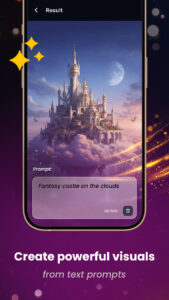
One of VidMind AI’s strongest features is its Text-to-Image generator, designed to deliver professional-level artwork with just a few words.
You simply type what you imagine:
“A girl made of galaxies floating through space.”
And within seconds, VidMind produces:
-
realistic art
-
fantasy illustrations
-
anime characters
-
abstract visuals
-
neon cyberpunk scenes
-
surreal landscapes
What makes the results so impressive?
VidMind’s models are trained on:
-
deep learning architecture
-
style-based optimization
-
high-definition output patterns
-
multi-style visual libraries
This means the app understands:
-
lighting
-
perspective
-
color theory
-
textures
-
artistic styles
-
realism vs stylization
Who benefits most from Text-to-Image?
-
artists exploring new ideas
-
teens designing wallpapers
-
marketers creating visuals
-
influencers designing thumbnails
-
digital creators experimenting freely
-
users who want aesthetic images instantly
Examples of prompts that work beautifully in VidMind:
-
“neon tiger with glowing eyes, cyberpunk forest”
-
“medieval castle floating in the clouds”
-
“portrait of a girl with crystal wings, high detail”
-
“rain-soaked city at night, cinematic lighting”
With VidMind AI, you don’t need drawing skills.
Just imagination.
Text-to-Video: Create Cinematic Clips Using Only Words
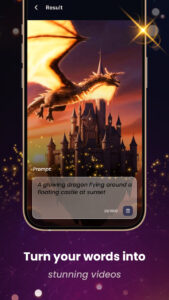
VidMind AI doesn’t stop with images — it also includes a powerful Text-to-Video generator, allowing Android users to create cinematic sequences with a prompt.
This is especially valuable because mobile video tools are historically very limited. But VidMind breaks through that barrier.
How it works:
You type something like:
“A dreamlike scene of blue butterflies flying through a dark forest.”
VidMind AI then generates:
-
animated movement
-
lighting transitions
-
atmospheric effects
-
storytelling elements
-
fluid camera motion
-
cinematic colors
All from one prompt.
What you can create:
-
aesthetic reels
-
TikTok micro-films
-
fantasy animations
-
visual storytelling videos
-
concept scenes
-
AI-based intro clips
-
dreamlike mood videos
What Makes ReelMate AI Different?
Why it’s important for Android creators:
Most cinematic AI-video tools are:
-
PC-only
-
heavy
-
technical
-
complex
VidMind brings cinematic AI video generation to Android, making it accessible for:
-
teens
-
influencers
-
content creators
-
hobbyists
-
visual storytellers
With VidMind, anyone can build a cinematic experience in less than a minute — using only their phone.
AI Photo Enhancer: Revive Old, Blurry, or Low-Quality Images
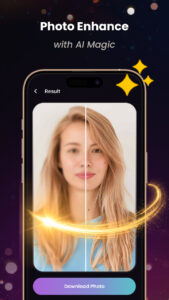
One of the most practical and surprising features in VidMind AI is the Photo Enhancer.
This tool can:
restore old photos
fix blurry images
bring out facial details
sharpen colors
increase resolution
revive memories
Unlike many mobile filters, VidMind uses actual AI reconstruction techniques, meaning:
-
lost details are rebuilt
-
faces become clearer
-
colors become richer
-
lighting improves realistically
Perfect for:
-
enhancing selfies
-
upgrading old family photos
-
fixing pictures taken in bad lighting
-
repairing low-quality mobile shots
-
improving product photos
-
preparing images for posting
This feature alone replaces the need for:
-
Photoshop
-
Lightroom
-
high-end editing tools
And it does so with one tap.
Creation History: Tracking Your Creative Journey
A surprisingly useful feature for active creators is VidMind’s Creation History, which stores:
-
every generated image
-
every video
-
every enhancement
-
every idea you tried
This means you can:
-
review your creative evolution
-
reuse old styles
-
refine ideas
-
go back and recreate variations
Most apps immediately discard past outputs, but VidMind understands creativity as a journey, not a one-time process.
What You Can Create With VidMind AI (Real-World Use Cases)
VidMind AI is not just a tool — it’s a creative ecosystem.
Here are some examples of what Android creators are making with it:
1. Aesthetic Wallpapers
Fantasy, neon, anime, abstract, moody, cyberpunk.
2. TikTok / Reels Micro Films
10–20 second cinematic scenes created with a single prompt.
3. AI Story Visualizations
Writers use VidMind to visualize characters and worlds.
4. Enhanced Personal Photos
Before/after results look like professional restoration.
5. Digital Posters
Perfect for artists who want quick inspiration.
6. Product Photography Enhancements
Make ordinary phone shots look studio-quality.
7. Anime & Character Shots
Great for fan art, cosplay design, or writing inspiration.
8. Short Concept Trailers
Simple text → mood video for storytelling.
9. YouTube Visual Elements
Thumbnails, banners, scenes, visual assets.
VidMind AI vs Other Android AI Apps
Below is a clean comparison table:
| Feature | VidMind AI | Pixelcut | Imagine AI | Kaiber Mobile |
|---|---|---|---|---|
| Text-to-Image | ✔ Yes | ✔ Yes | ✔ Yes | ✔ Partial |
| Text-to-Video | ✔ Yes | ❌ No | ❌ No | ✔ Yes |
| Photo Enhancement | ✔ Full | ✔ Basic | ✔ Basic | ❌ No |
| Creation History | ✔ Yes | ❌ No | ❌ No | ❌ No |
| Multimodal Creation | ✔ Images + Videos + Enhance | ❌ Limited | ❌ Limited | ✔ Videos Only |
| Beginner-Friendly | ✔ Very Easy | ⚠ Medium | ⚠ Medium | ⚠ Hard |
| All tools in one app | ✔ Yes | ❌ No | ❌ No | ❌ No |
VidMind is the most balanced, complete, and beginner-friendly among Android AI apps.
FAQ
1. Can VidMind AI really generate both images and videos on Android?
Yes — this is one of its core strengths. You can create still art and cinematic clips in seconds.
2. How accurate is the Text-to-Video feature?
VidMind uses advanced neural rendering, generating highly expressive and dynamic video sequences.
3. Does the Photo Enhancer damage or distort images?
No. VidMind reconstructs details naturally using AI restoration, giving realistic results.
4. Is VidMind AI safe for personal photos?
Yes. The app is designed for personal use, and it prohibits impersonation or misuse.
5. Do I need a powerful Android phone?
No. VidMind is optimized to run smoothly on most modern Android devices.
Conclusion
VidMind AI is more than an Android app —
it’s a mobile creative revolution.
With just one app, users can:
-
turn text into images
-
turn words into cinematic videos
-
enhance any photo
-
track their entire creative history
What once required powerful PCs, expensive software, and hours of editing is now possible with a smartphone and a few taps.
Whether you’re a teenager experimenting with ideas, a content creator seeking quick visuals, or just someone who loves turning imagination into reality — VidMind AI opens the door to a new era of creativity.
Your Android phone is no longer just a device —
with VidMind AI, it becomes a digital art studio.